 3D scene & material studio

Shape a scene. Find its light. Keep every idea editable.
Renderloom is a free local 3D scene and material studio. Arrange editable solids, save camera shots, compare light rigs and render six diagnostic passes with the shared Kerfwise concept renderer. Texture Lab turns local images into height, normal, roughness, occlusion and metalness maps for compatible 3D applications; Figure Lab, shared with Panelcraft, adds original stylized parametric figures, and Voxel Desk builds colorful models on a three-dimensional grid. Save editable scenes, texture recipes, rendered PNG/SVG images and OBJ/STL geometry without an account.

Screenshots
 Scene studio: editable solids, camera shots, local light and six render passes
 Compare four light rigs with a fixed scene, camera and seed
 Texture Lab: local image authoring, map previews, channel packing and reusable material recipes
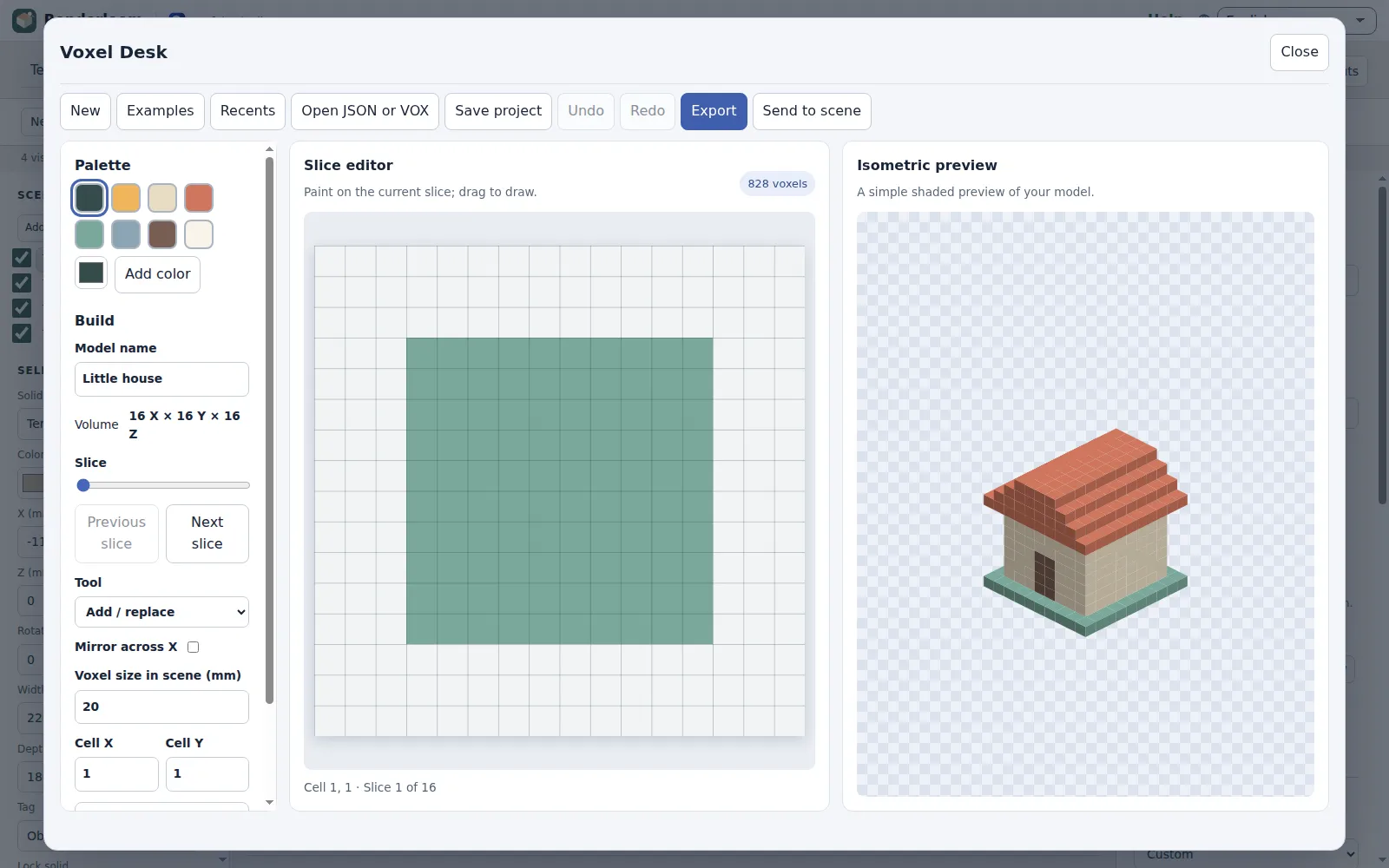 Voxel Desk: build colored grids slice by slice and send them to the scene
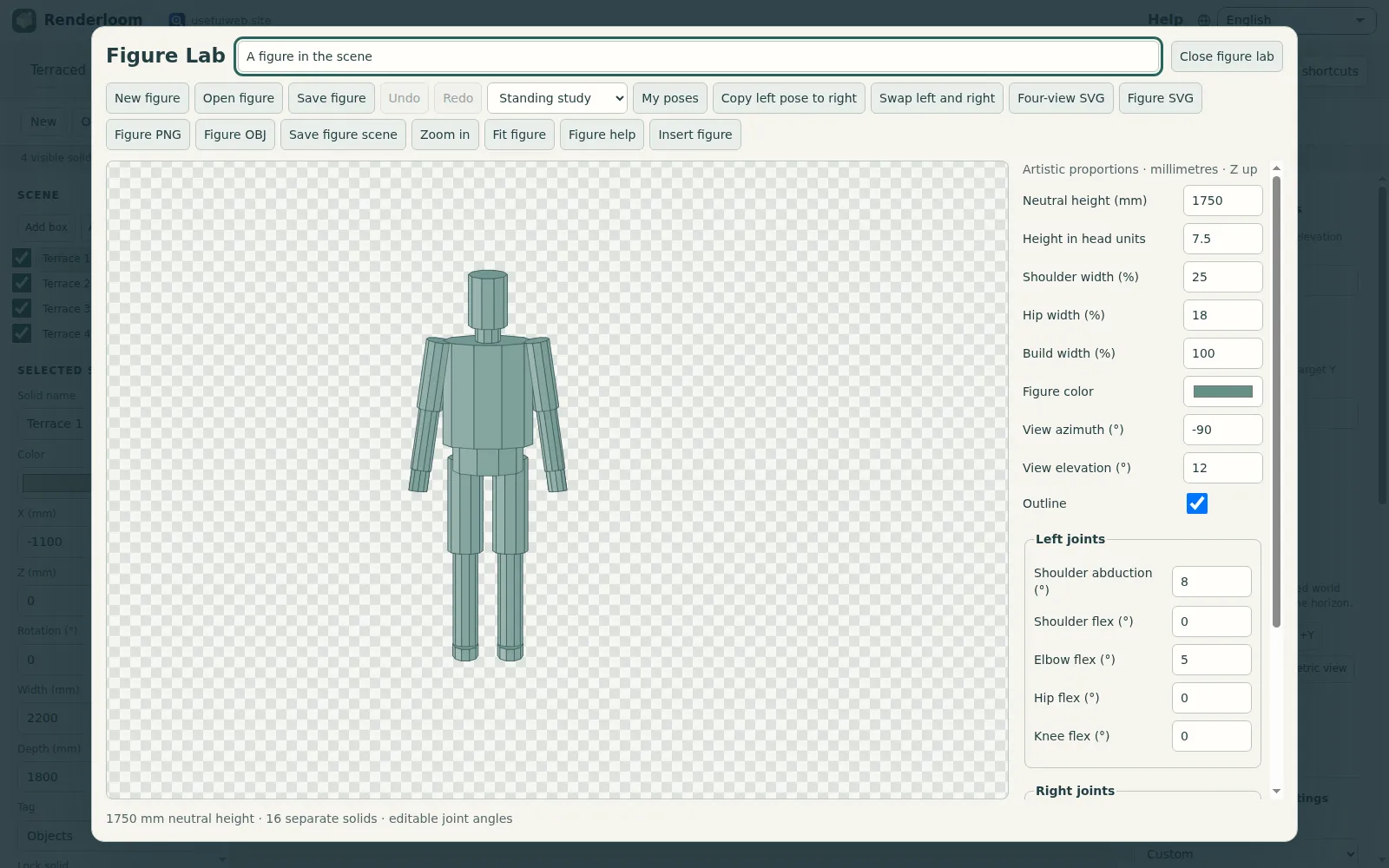 Figure Lab: stylized pose references that insert as editable solids
Features
A scene of your own
Build from boxes and cylinders or open an existing Kerfwise Form Studio model. Edit exact placement, dimensions, rotation, colors, tags, visibility and locks.
Repeat with arrays
Arrange independent copies of a selected solid in a line or around a vertical axis, preserving its finish and keeping the whole operation undoable.
Find the light
Control light direction, elevation, softness, ambient light and exposure. Compare four light rigs while the scene, camera and seed remain fixed.
Frame the idea
Use quick world-axis views, frame a selected solid or fit the visible model, and keep up to eight named orthographic camera shots. Image pan and zoom are independent of the scene camera.
Inspect six passes
Beauty, base color, surface normals, depth, light visibility and object IDs help diagnose geometry and lighting. Workers show progress and support cancellation.
Texture Lab
Create deterministic texture maps from a local PNG, JPEG or WebP. Adjust height levels, normal strength, roughness, occlusion and seamless edge blending, then keep the source and recipe together.
Voxel Desk
Build and paint colored voxels on editable slices with a shaded isometric preview. Merge adjacent colors into editable scene solids or export voxel projects and geometry.
Figure Lab
Create stylized figures with editable joints, start from eight pose starters, keep your own poses locally and export a four-view reference. Insert editable solids for scale and composition.
Simple finishes
Use matte, satin or metal per solid. Source colors are preserved. Texture maps export separately for 3D applications that support them.
Four original starting scenes
Explore a studio corner, courtyard pavilion, terraced forms or an L-shaped counter. Each scene includes editable solids, notes and saved cameras.
Keep the work editable
Undo and redo up to forty edits, autosave locally and reopen the five latest scenes. Download native project files or use Save As with the browser file picker.
From concept to delivery
Download PNG or image-based SVG renders, print to PDF, export OBJ/STL geometry and save reusable Form Studio models or render recipes.
Shared engines, useful tools
Reuse scene previews, sampling budgets, profile extrusion, model reports, light comparisons and texture calculations through usefulweb forms, JSON API and MCP.
On your device
Scene editing, rendering, texture processing and browser autosave run locally. No login, remote render service, runtime package or external font is required.
Templates
Start from a ready-made project and change it to fit.
Studio corner
A quiet workspace. Compare warm wood with cool upholstery.
Courtyard pavilion
A simple pavilion: inspect canopy shadows and ground contact.
Terraced forms
Four levels for comparing grazing light and material finishes.
L-shaped counter
A compact counter concept with an L-shaped profile.
Little house
A tiny house with a stepped roof.
Quiet tree
A tree for a small landscape.
Pocket robot
A friendly block-built character.
Built-in tools
Renderloom uses these tools. Each one also has its own page and works on its own, in the browser, through the JSON API and through MCP.
- Voxel Height Grid Builder Renderloom engineBuild an editable voxel model from rows of integer heights.
- Voxel Model Inspector Renderloom engineInspect a native voxel model and export its surface mesh.
- Scene Light Rig Comparison Renderloom engineCompare four deterministic light rigs on the same 3D concept.
- Height Grid to Material Maps Renderloom engineTurn numeric height samples into normal, roughness, cavity and ORM maps.
- Texture Tile Seam Checker Renderloom engineMeasure opposite-edge jumps and feather a reusable numeric texture tile.
- 3D Scene and Render Pass Preview Renderloom engineLight a Kerfwise concept and inspect beauty, color, normals, depth and object IDs.
- Render Sampling Budget Renderloom engineCompare image size, sample workload and a simple sampling-noise estimate.
- Footprint to 3D Solid Extruder Renderloom engineTurn a simple footprint into a closed 3D solid with OBJ, STL and editable geometry.
- 3D Form Model Report & Export Renderloom engineMeasure a form model by tag and export its geometry as OBJ or STL.
For AI agents
Renderloom runs on a deterministic engine. The same functions are available as tools with a JSON API and MCP, so scripts and AI agents get exactly the results the app shows.
- Voxel Height Grid Builder – Build an editable voxel model from rows of integer heights.
Tool page ·POST https://renderloom.usefulweb.app/api/v1/tools/renderloom-voxel-height-grid/calculate· MCPrenderloom_voxel_height_grid - Voxel Model Inspector – Inspect a native voxel model and export its surface mesh.
Tool page ·POST https://renderloom.usefulweb.app/api/v1/tools/renderloom-voxel-inspector/calculate· MCPrenderloom_voxel_inspector - Scene Light Rig Comparison – Compare four deterministic light rigs on the same 3D concept.
Tool page ·POST https://renderloom.usefulweb.app/api/v1/tools/renderloom-light-rigs/calculate· MCPrenderloom_light_rigs - Height Grid to Material Maps – Turn numeric height samples into normal, roughness, cavity and ORM maps.
Tool page ·POST https://renderloom.usefulweb.app/api/v1/tools/renderloom-height-material/calculate· MCPrenderloom_height_material - Texture Tile Seam Checker – Measure opposite-edge jumps and feather a reusable numeric texture tile.
Tool page ·POST https://renderloom.usefulweb.app/api/v1/tools/renderloom-tile-seam/calculate· MCPrenderloom_tile_seam - 3D Scene and Render Pass Preview – Light a Kerfwise concept and inspect beauty, color, normals, depth and object IDs.
Tool page ·POST https://renderloom.usefulweb.app/api/v1/tools/kerfwise-scene-preview/calculate· MCPkerfwise_scene_preview - Render Sampling Budget – Compare image size, sample workload and a simple sampling-noise estimate.
Tool page ·POST https://renderloom.usefulweb.app/api/v1/tools/kerfwise-render-budget/calculate· MCPkerfwise_render_budget - Footprint to 3D Solid Extruder – Turn a simple footprint into a closed 3D solid with OBJ, STL and editable geometry.
Tool page ·POST https://renderloom.usefulweb.app/api/v1/tools/kerfwise-profile-extruder/calculate· MCPkerfwise_profile_extruder - 3D Form Model Report & Export – Measure a form model by tag and export its geometry as OBJ or STL.
Tool page ·POST https://renderloom.usefulweb.app/api/v1/tools/kerfwise-model-report/calculate· MCPkerfwise_model_report
- MCP endpoint (Streamable HTTP):
https://renderloom.usefulweb.app/mcp - Project file format (JSON Schema): https://renderloom.usefulweb.app/project.schema.json
- OpenAPI description: /openapi.json · llms.txt · API & MCP
Build a project through the API, then open it in the app with a link to https://renderloom.usefulweb.app/app#project=<base64url JSON>.
Import & export
Import
- Voxel project JSON
- VOX 150 (single opaque model subset)
- Renderloom scene JSON
- Kerfwise Render Desk recipe JSON
- Kerfwise Form Studio JSON
- PNG/JPEG/WebP texture source
- Renderloom material JSON
- Figure project JSON in Figure Lab
Export
- Voxel project JSON
- Single-model VOX 150
- Voxel preview SVG/PNG
- Voxel OBJ with MTL colors
- Renderloom scene JSON
- PNG render
- Image-based SVG render
- Print/PDF
- Light comparison SVG
- Kerfwise render recipe JSON
- Kerfwise Form Studio JSON
- OBJ mesh (mm)
- STL mesh (mm)
- Plan SVG
- Texture map PNG
- Renderloom material JSON
Keyboard shortcuts
| Keys | Action |
|---|---|
| Ctrl/Cmd + S | Save scene |
| Ctrl/Cmd + Shift + S | Save as |
| Ctrl/Cmd + O | Open scene |
| Ctrl/Cmd + Z / Shift + Z | Undo / redo |
| Ctrl/Cmd + Y | Redo |
| Ctrl/Cmd + C / V | Copy / paste solid |
| Ctrl/Cmd + D | Duplicate solid |
| Delete | Delete selected solid (preview or object list focused) |
| Arrow keys | Nudge by the grid, Shift = ×10 (preview or object list focused) |
| F | Fit image (single-key shortcut, can be switched off) |
| R | Render preview (single-key shortcut, can be switched off) |
| ? | Help and shortcuts (single-key shortcut, can be switched off) |
Frequently asked questions
What is Voxel Desk?
A local voxel editor with a slice grid, indexed colors and a shaded isometric preview. Import and export a single opaque VOX 150 model, or export a voxel project and color-preserving OBJ/MTL geometry. VOX scene graphs, materials and transparency are not imported. Adjacent same-color voxels can be merged into editable scene solids if they fit the 128-solid scene limit. The preview is not path tracing.
Does Renderloom replace a full production renderer?
It is a compact concept studio using orthographic rays, direct light, soft shadows, ambient occlusion and one metal reflection. It does not offer path tracing, glass, EXR or arbitrary mesh imports.
Can I use my existing Kerfwise work?
Yes. Open a Form Studio project or Render Desk recipe directly. Export the same reusable formats from Renderloom to continue in Kerfwise. The original Kerfwise desks remain available.
Are Texture Lab maps rendered on scene solids?
The concept renderer uses source colors and matte, satin or metal finishes. Texture Lab exports maps and editable recipes for applications that support textured materials; it does not apply PBR maps to this renderer.
Are Figure Lab figures anatomical human models?
They are stylized parametric reference solids for proportion, staging and scale. They are not MakeHuman meshes, medical anatomy, skinned characters or animation rigs.
Where are scenes saved?
The five latest scenes autosave in this browser. Save editable project files for backups, transfer between devices and long-term storage.
Limitations
What Renderloom does not do (yet):
- At most 128 solids and 4096 visible triangles; page renders allow 384000 pixels and 6 million pixel samples.
- Orthographic concept rendering only: no path tracing, glass, arbitrary mesh import, EXR or distributed rendering.
- Texture maps export separately; the renderer supports source colors and three simple finishes.
- Figures are stylized reference solids without anatomical guarantees, skinning or animation rigs.
- OBJ/STL exports keep separate overlapping solids; they do not perform boolean unions.
- Browser storage can be cleared. Download project files for a durable backup.
Tutorials
Learn Renderloom step by step.
- Your first scene and renderBuild a small editable 3D concept, set a camera and export a local render.Beginner 6 min
- Arrange solids and save camera shotsWork with units, grid snapping, exact transforms and reusable camera views.Intermediate 7 min
- Compare light and inspect render passesUse four light rigs, deterministic sampling and six diagnostic passes.Intermediate 8 min
- Add texture studies and figure referencesUse Texture Lab and Figure Lab alongside an editable scene.Beginner 8 min
- Build and export voxel modelsSculpt colored block models slice by slice, import VOX files and send the result to your scene.Beginner 9 min
Ready to try it?
Other premium apps
-

Kerfwise
Cabinet & furniture CAD
Design cabinets and furniture, get cut lists, optimised sheet layouts, costs and drawings.
-

Kinetica
Robot motion studio
Simulate robot arms in your browser: kinematics, trajectories, collisions, program export.
-

Threadsmith
Embroidery digitizing studio
Draw or import artwork, turn it into stitches, export DST, PES, JEF or EXP files.
-

Ohmforge
Virtual electronics workbench
Draw a circuit, switch it on, and measure it with real-feeling bench instruments.
-

Twinworks
Factory digital twin & production simulation
Model a production line, simulate it and find the bottleneck — free, in your browser.
-

Agentlab
AI-agent & LLM workbench
Test an AI agent before release: permissions, traces, costs, citations and output checks.
-

Bundlekeep
Local project backup
Back up projects from every usefulweb app into one file, check it and restore any part.
-

Chainscope
Web3 investigation desk
Investigate transactions, bridges, contracts, DAOs and wallets in one case file.
-

Chartroom
Data & charts studio
Import data, chart it, run analyses and publish a report — one workspace, free.
-

Fieldday
Sports club & training organiser
Fixtures, brackets, ratings and training plans for your club — in one workspace.
-

Flipline
Drawing, storyboards & animation
A few drawings. A little life. Make a flipbook in your browser.
-

Hearth
Home & travel planner
Plan meals, chores, home care, a move and trips for your whole household in one place.
-

Keysmith
Crypto & secrets lab
Audit certificates, keys, TLS and passwords in one lab; secrets stay on your device.
-

Ledgerly
Household finance & life-admin desk
Budgets, bills, subscriptions, loans, contracts and deadlines on one private desk.
-

Lumina
Photo editor & image toolkit
Bring out what you saw. A free photo studio, right in your browser.
-

OBSCURIQ
OSINT case desk
Organize public-source research: cases, a research log, pivots and indicators.
-

Opsdeck
Developer & ops workbench
One deck for CI failures, cron, traces, k8s events, API diffs, query plans and Terraform.
-

Pageboard
Website inspiration boards
Collect website references, sort them with tags and arrange them on a moodboard.
-

Panelcraft
Comic books & figure references
Shape a page. Arrange a book. Give your story a voice.
-

Paperwell
Document studio: PDFs, OCR, redaction, forms & contract reading
Your paperwork in one dossier: PDF tools, OCR, redaction, forms and contract reading.
-

Proofline
Math notebook
Solve, graph, test and visualise in one notebook — with data, findings and a report.
-

Provenance
Software supply-chain security desk
SBOMs, CVEs, containers and licences in one risk register — free, in your browser.
-

RavingDesk
Paper trading workspace
Practise trading on paper: orders, ledger, risk, exposure and journal. No real money.
-

Reelcraft
Audio, video & image batch studio
Audio, video & image batch studio: cut, convert, compress, subtitle, reframe
-

Signalhouse
Website & internet infrastructure inspector
Inspect DNS, TLS, mail, CDN and routing of all your domains — and see what changed.
-

Tonegrid
Tone matrix & beat sequencer
Light up squares to build looping melodies and beats, then arrange them into songs.